 Desktop Note
How to add a note widget to your iPhone Home Screen
Display a selected Desktop Note note or checklist on your iPhone Home Screen and troubleshoot missing or outdated widget content.
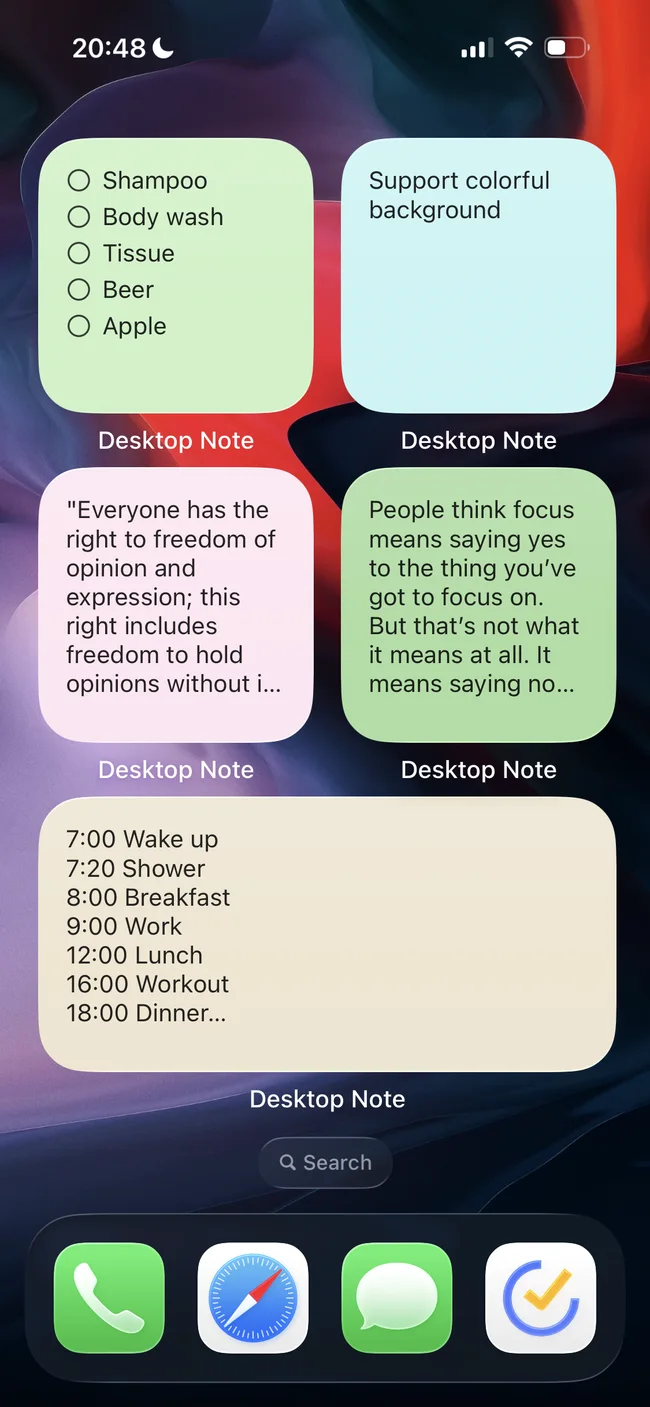
A Desktop Note widget shows a selected note or checklist on your iPhone Home Screen. It is useful for a shopping list, a short study prompt or the few tasks you want to see before opening another app. Create the content in the app first, then choose it in the widget.
Add and choose a note
- Open Desktop Note and save a note with a clear title. For a checklist, add the individual tasks before configuring the widget.
- Enter Home Screen editing mode and open the widget gallery. Apple’s button names can vary with the iOS version.
- Find Desktop Note, choose the note widget and a suitable size, then add it to your Home Screen.
- Touch and hold the widget, select Edit Widget, and use Note to choose the saved item. A widget without a selection may ask you to choose a note.
- Leave editing mode and check that the expected title and content appear. Move the widget to the Home Screen page where you will actually use it.
Make the small space useful
A widget has limited space. Put the essential information first and choose a larger size for a longer checklist. Keep the complete details in the note rather than trying to fit an entire document into a small rectangle. A separate photo widget is available when the thing you want to see is a picture.
If the content looks wrong
Open Desktop Note and confirm that the note exists and is active. Reopen Edit Widget to check the selected note, especially after importing or reorganizing content. If the note came from your Mac, wait for it to appear in the iPhone app before diagnosing the widget. App synchronization and widget refresh are separate steps; neither should be treated as an instantaneous delivery guarantee.
These instructions cover Home Screen widgets, not Lock Screen widgets. Editing the note remains an app workflow. Start with one non-sensitive note so you can judge whether its visibility and size suit your everyday use.